Keep on top of client deadlines and practice tasks
LedgerDue tracks your clients' VAT, Corporation Tax, Self Assessment, PAYE, Confirmation Statements and other deadlines in one place, alongside your own practice tasks – and reminds you before each one falls due.
From £5 per month
Start with a 14-day free trial. No card required to begin.
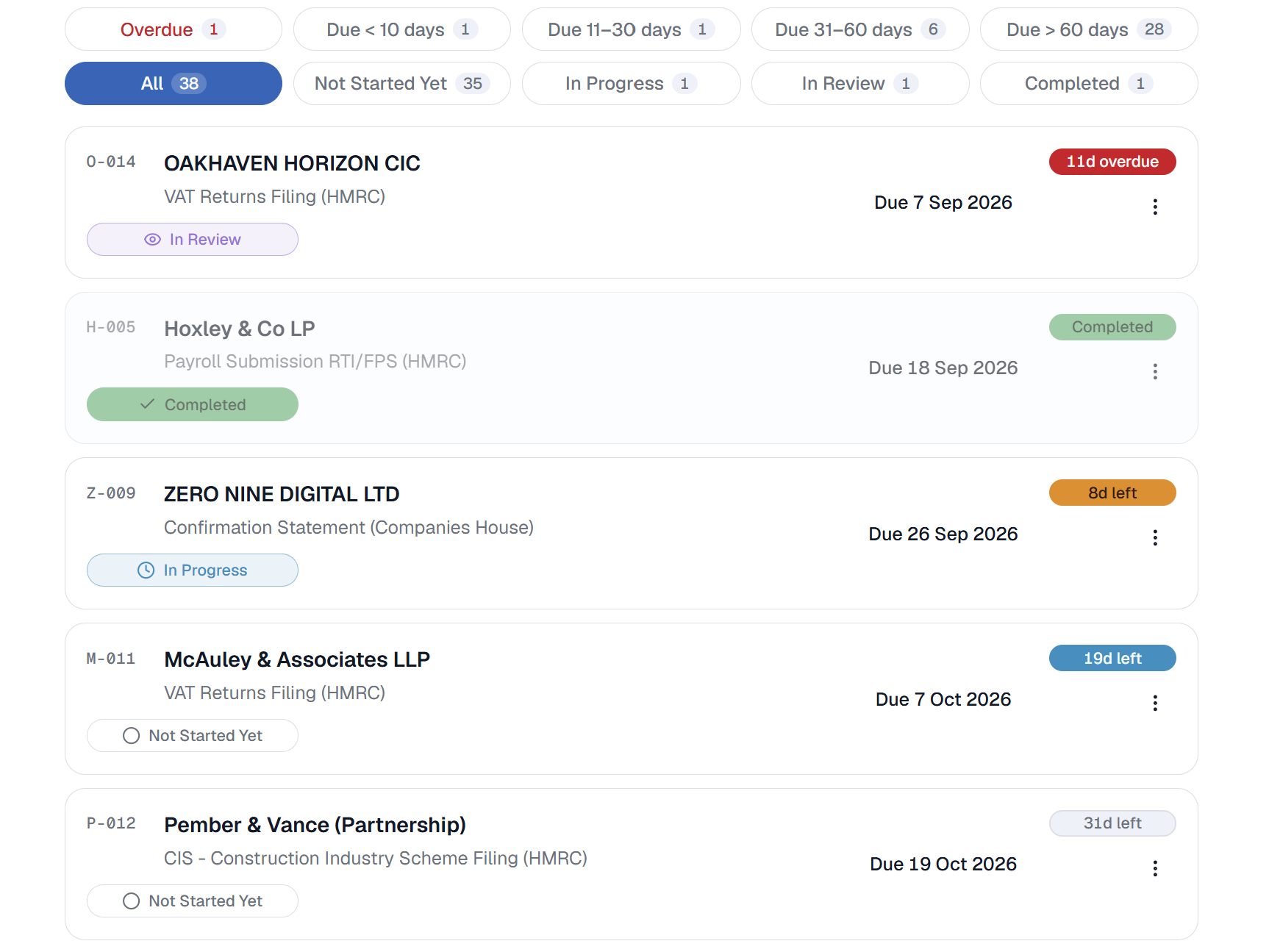
Deadline management, done properly
From sole traders to charities, track compliance across a whole book of clients – the statutory backbone your practice runs on.
All your client deadlines in one view
Tax returns and payments, annual accounts, payroll, CIS and more – tracked per client and sorted by what is due next.
Reminders before it matters
Push notifications at the intervals you choose, so a deadline doesn’t catch you out and you never deal with daily noise.
Recurring obligations, handled
Deadlines from weekly to annual roll forward automatically. Set up a client once and LedgerDue keeps the schedule going.
Clear status at a glance
Overdue, due soon, upcoming, in review and completed – colour-coded so you know where each client stands.
Built for how practices work
A new client, an agreed extension, a return waiting for review. Ready-made deadlines, date overrides and a review stage cover each.
Grows with your firm
Start solo and add colleagues when you are ready. Assign clients to team members, who see only their own, while you see them all.
Practice tasks, not just deadlines
LedgerDue gives you a private workspace for the ad-hoc jobs, reminders and practice notes that don’t belong to a single client, from chasing an insurance renewal to preparing figures for a meeting. You manage them the same way as your client deadlines.
Status you can move through
Add anything that shapes your working day, from client jobs to a dentist appointment. Set a due date, make it one-off or recurring, and move it from not started to completed as the work progresses. Colour-coded by urgency so you can see where each task stands, with a calendar view for quicker planning.
Reminders as it falls due
Get push notifications as a task approaches, at the intervals you choose, plus an email reminder if you want one. Alerts follow the same settings as your client deadlines and stop once you complete the task. It is still visible on your list and calendar unless you archive or delete it.
Completely private to you
Share an account with colleagues and your notes and tasks stay yours alone. No one else can see them, not even the owner or a manager, and they never show up on client records or the Deadlines page. Reminders come only to you, and everyone keeps their own list.
Starts with you, grows with your team
LedgerDue suits a sole practitioner from day one. Team plans let you bring in colleagues, share the workload and still see the whole picture.
Invite your team
Add colleagues to your practice at no extra cost per person – they join in a couple of clicks. Choose each person’s role and what they can do with client deadlines, and change your mind whenever you like.
Assign the clients
Give each team member exactly the clients they handle. They see those deadlines and get reminders for them – and nothing else. Reassign a client whenever the workload shifts.
Keep full oversight
As practice owner or manager, you retain complete control of every client, deadline, status and detail across the firm. Only private notes and tasks stay out of reach, and everyone keeps their own.
Your deadlines and tasks, on every device
Install LedgerDue on your computer or phone straight from your browser, as a progressive web app – no app store needed. Open it like any other app and pick up right where you left off.
Frequently asked questions
Which deadlines can LedgerDue track?
LedgerDue is built around UK statutory obligations for every client type – sole traders, partnerships, limited companies, LLPs, PLCs, CICs, limited partnerships and charities. Each one comes with all of its standard deadlines ready-made, from accounts, Corporation Tax and Self Assessment to VAT, payroll, CIS, MTD for Income Tax, PAYE and RTI, and more. You can also add your own one-off deadlines for anything specific a client needs.
Can I track my own tasks and notes, not just client deadlines?
Yes. Every LedgerDue account includes a private workspace for ad-hoc jobs and reminders that don’t belong to a specific client, complete with calendar view, one-off and recurring tasks added in one click. Each item features a due date and status, sends you reminders, and stays completely private to you – no one else on the account, not even the owner or a manager, can see them.
Is LedgerDue suitable for a sole practitioner?
Yes. It is designed first for sole practitioners and small firms, because it was built by a UK sole practitioner who started out using Excel and wanted a reliable way to track deadlines without the bloat and heavy overhead of traditional practice management software.
Can I add team members?
Yes. On Team and Firm plans you can invite colleagues in one of two roles. Managers get full access to every client and to team management (everything except billing and ownership), which is ideal for a partner or for holiday cover. Members work only on the clients assigned to them, with custom permissions you can widen or narrow per person at any time. Either way you keep full oversight of every deadline across the practice.
How do the Team and Firm plans work?
The person who subscribes becomes the account owner and holds full control – clients, statutory deadlines, billing and settings. You can invite colleagues as managers, who share full access to every client and to team management (but not billing or ownership), or as members, who only see the clients assigned to them, with custom permissions you can widen or narrow per person. You can change anyone’s role or permissions at any time, upgrading or downgrading as your practice needs. Team plans cover up to 4 users, including you, and Firm plans up to 11, at a flat monthly price. Everyone still keeps a private workspace for their own notes and tasks.
Can I hand the account to someone else?
Yes. The owner can transfer ownership and billing to a colleague, and the previous owner automatically becomes a manager with full day-to-day access. You can change anyone’s role at any time, from manager down to member or back up again. If someone leaves, the clients they created stay with the practice.
Is there a mobile app?
There isn’t an app in the app stores yet, and one may follow in the future. For now, LedgerDue can be installed as a progressive web app on both desktop and mobile, so you can add it straight to your home screen like a native app without going through an app store.
Who built LedgerDue?
LedgerDue was built by a practising UK accountant, so it is shaped around how real practices actually track VAT, MTD, Corporation Tax, Confirmation Statements, PAYE, Self Assessment and other deadlines, alongside a dedicated tasks page for managing general practice work, rather than being a generic project management tool adapted after the fact.
Does LedgerDue integrate with HMRC or Companies House?
No. Most UK statutory obligations follow clear schedules that can be tracked without a direct API connection. Avoiding complex integrations keeps the app fast and reliable, and keeps subscription pricing low and affordable to all. You just need to set up a client once, and LedgerDue works out the deadlines and rolls them forward from there.
Try LedgerDue free for 14 days
Set up your practice, add your clients, manage your practice workflow and see every deadline in one place – before you pay a penny.
Get startedNo card required to begin. Plans from £5 per month.